|

- UID
- 487464
- 帖子
- 49
- 主題
- 49
- 精華
- 0
- 積分
- 50
- 楓幣
- 477
- 威望
- 49
- 存款
- 0
- 贊助金額
- 0
- 推廣
- 0
- GP
- 49
- 閱讀權限
- 10
- 性別
- 保密
- 在線時間
- 15 小時
- 註冊時間
- 2025-8-2
- 最後登入
- 2025-9-27
|
|
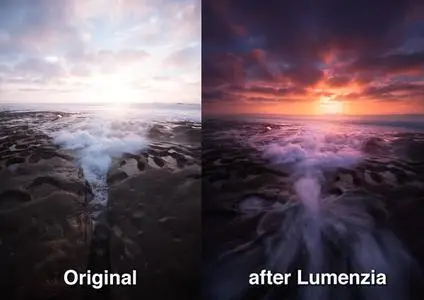
Free Download Lumenzia 11.9.0 (Win/macOS) | 100.9 Mb
Luminosity masks allow you to create gorgeous and realistic edits in Photoshop. Lumenzia allows you to use use them quickly and easily. Its advanced JavaScript engine handles all the luminosity masking complexity for you in the background, so all you need to think about is making beautiful images.
Features:
Dynamic interface with sliders to quickly and easily create custom masks
BlendIf and Vector masks (to save significant file space and avoid the need to update masks)
Color masks and color BlendIf masks
Zone masks for precise midtone selection
Zone and Range pickers to select midtones by clicking on the image
Difference masks to select pixels which are lighter or darker than their surroudings or other layers
Saturation masks to manage out of gamut colors and more
Vibrance masks for color-specific vibrance adjustments and more
Zone maps to visualize the image in zones 0-10.
Visualize and edit luminosity selections just like layer masks
Add, subtract, or intersect any mask or selection for advanced control
Local Contrast Enhancement (easily and automatically bring out more detail)
Live masks (see the blended result immediately and try different masks)
Refine masks to specific locations or colors in the image
Combine masks (merge group masks to save space and see exactly what is masked)
Support for paths, to facilitate use of luminosity masks with hard edges in architecture
Split-screen to see the mask and image simultaneously
"PreBlend" to automatically stack, align, and sort exposures for blending
Utility to save files >4GB which can be viewed in Lightroom
Non-destructive sponge tool (advanced saturation painting)
Custom vignettes
Advanced Dodging and Burning tools, including visuzliation or the ability to select adjusted areas
Luminosity and dust visualization tools to easily find and fix defects
Advanced sharpening methods for portraits (surface blur) and landscape (high pass)
Apply or replace masks on existing layers with a single click
Recordable actions to include light and dark masks/selections in your own actions.
Training and support videos, as well as a comprehensive written manual
Key benefits:
- Select and mask anything, visually! With Lumenzia, you get a full screen preview of the mask before you apply it. Interactively click on the image to select (or deselect) the tones/colors to the degree you wish. No guesswork with adding and subtracting channels. Isolate the mask to to specific parts of the image with a simple selection. And you can combine group masks to easily see the overall mask impact. It's never been faster and easier to create or customize the right mask. And the masks are created in 16-bits, allowing for smooth transitions in extreme masks.
- Click to pick! You don't have to know which mask to use, just use the built-in zone and range tools to create the right mask automatically.
- It's stays out of the way. Lumenzia offers a compact panel with only the buttons you need, and completely eliminates the need for the channels pallet. This leaves room to easily see your images big and beautiful, even on a laptop screen. Every action in Lumenzia creates just a single history step, so you can undo anything with-Z. And because Lumenzia is programmed in JavaScript, it's smart enough to take care of errors and other tricky situations for you.
- Simplify exposure blending. Automatically stack, align, and sort your exposures light to dark for blending.
- Smaller files. Lumenzia doesn't use channels, so your files stay small. Additionally, it offers BlendIf and vector masks to avoid layer mask bloat, as well as a "Combine" tool to reduce the impact of group masks. A typical TIF file from a Nikon D800 grows from 200MB to 1.4GB when creating channel masks, but would remain the same 200MB size in Lumenzia. And Lumenzia can combine group masks to significantly cut down on ✅File Size, often reducing ✅File Size by 20-50%!
- Beautiful vignettes with ease. Just draw a selection around the target area to create a vignette of any size, sharp, or position in the image. The vignette can be easily modified, inverted (to lighten the center) or combined with luminosity masks (to avoid darkening shadows too much).
System requirements:
Lumenzia is compatible with Photoshop CS6 - CC 2019+ on both windows and osx (CC 2019 or later recommended). Lumenzia does not support CS5 or earlier (however, you may wish to try my free luminosity masking panel/actions instead). Note that the CS6 user interface functions the same, but looks somewhat different (see the FAQ link above for a comparison).
Home Page -- https://gregbenzphotography.com/
bsj4s.Lumenzia.11.9.0.WinmacOS.zip (100.91 MB)
Links are Interchangeable - No Password - Single Extraction
|
|





 發表於 2025-8-15 05:54:27
 收藏
收藏 推
推 噓
噓

 提升卡
提升卡 置頂卡
置頂卡 變色卡
變色卡 搶沙發
搶沙發 千斤頂
千斤頂


