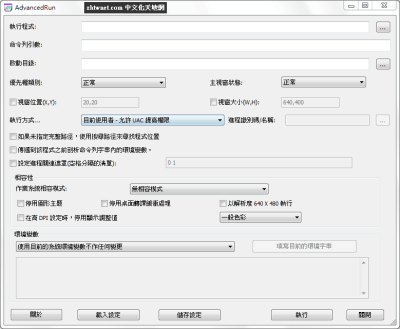
AdvancedRun 是 NirSoft 所出的一套簡單的系統工具,在 AdvancedRun 的協助下提供您使用比 Windows 更多所選的不同進階設定選項,如低或高優先權、啟動目錄、主視窗狀態(最小化/最大化),以不同的使用者或權限執行程式、作業系統相容模式和環境變數來執行應用程式。您可以將所需的設定儲存到設定檔,然後從命令列以所需的設定自動地執行程式。
您可以使用 AdvancedRun 的例子
在 Windows 10/8/7/Vista 上不需提高權限以一般使用者身份執行 Windows RegEdit 登錄編輯程式。在此模式下,您將不能存取或修改需要系統管理員權限的登錄機碼。
在 Windows 10/8/7/Vista 上以系統使用者身份執行 Windows RegEdit 登錄編輯程式。在此模式下,您將能夠存取 HKEY_LOCAL_MACHINE\SECURITY 機碼。
使用另一個執行中進程的使用者來執行程式。
以高優先順序執行程式。
以 Windows XP 相容性模式執行特定的程式執行個體,不需要在系統登錄中作全域變更。
以不同的路徑環境字串執行特定的程式執行個體,而無需修改整個系統的路徑字串,也無需使用批次檔或命令提示字元視窗。
使用全套完整您所選擇的環境變數來執行程式,完全忽略系統環境變數。
AdvancedRun is a simple tool for Windows that allows you to run a program with different settings that you choose, including – low or high priority, start directory, main window state (Minimized/Maximized), run the program with different user or permissions, Operating system compatibility settings, and environment variables. You can also save the desired settings into a configuration file and then run the program automatically from command-line with the desired settings.
MEGA 免空已經改版,要直接下載請按下方的小字「透過瀏覽器下載」Download through your browser 才能透過瀏覽器直接下載。
下載連結:(解壓密碼:)
最新版→ [1.05]

| 歡迎光臨 冰楓論壇 (https://bingfong.com/) | Powered by 冰楓 |