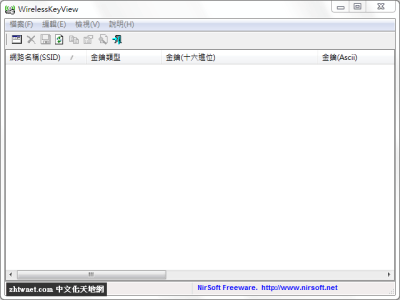
Wirelesskeyview 是 NirSoft 出品的一款 WiFi 密碼查看工具,當您忘記原本所設定的無線網路密碼時,可以利用 WirelessKeyView 來快速找回原本儲存在電腦中的無線網路登入密碼。
WirelessKeyView 使用 Windows XP 的 ‘Wireless Zero Configuration’ 服務或 Windows Vista/Windows 7/Windows 8/Windows Server 2008 的 WLAN AutoConfig 服務來找回所有儲存在您電腦中的無線網路金鑰/密碼(WEP/WPA)。它允許您輕鬆地將所有金鑰儲存成 text/html/xml 檔,或將單一金鑰複製到剪貼簿。
執行它之後,主視窗應顯示所有儲存在您電腦中的 WEP/WPA 金鑰。WEP 金鑰也以 Ascii 形式顯示。請注意此應用程式只能顯示 Windows 作業系統所儲存的網路金鑰。它無法復原任何其他協力廠商軟體所儲存的網路金鑰。
【軟體名稱】:WirelessKeyView 2.00 中文版 – 無線網路密碼查看工具WirelessKeyView recovers all wireless network security keys/passwords (WEP/WPA) stored in your computer by the ‘Wireless Zero Configuration’ service of Windows XP or by the ‘WLAN AutoConfig’ service of Windows Vista, Windows 7, Windows 8, Windows 10, and Windows Server 2008. It allows you to easily save all keys to text/html/xml file, or copy a single key to the clipboard. You can also export your wireless keys into a file and import these keys into another computer.
MEGA 免空已經改版,要直接下載請按下方的小字「透過瀏覽器下載」Download through your browser 才能透過瀏覽器直接下載。
下載連結:(解壓密碼:)
最新版→ [2.00]

| 歡迎光臨 冰楓論壇 (https://bingfong.com/) | Powered by 冰楓 |