冰楓論壇
標題:
【兩步驟驗證】即刻起新增Google Authenticator作為驗證方式
[打印本頁]
作者:
冰楓
時間:
2022-11-7 03:22
標題:
【兩步驟驗證】即刻起新增Google Authenticator作為驗證方式
為提供會員更便捷的登入驗證方式,本站即刻起開放透過Google Authenticator進行登入驗證,使用教學如下:
添加Google Authenticator驗證方式
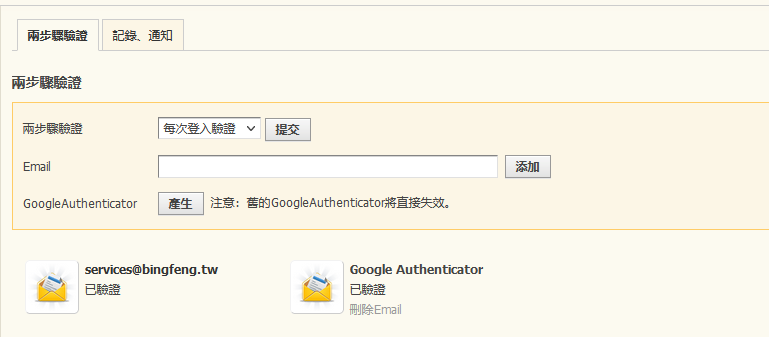
1.前往「
設置-安全設定
」並選擇Google Authenticator點選產生。
注意!若先前已有產生過密鑰,則再次點擊產生後系統會自動將舊密鑰刪除!
2022-11-7 03:21 上傳
下載附件
(8.4 KB)
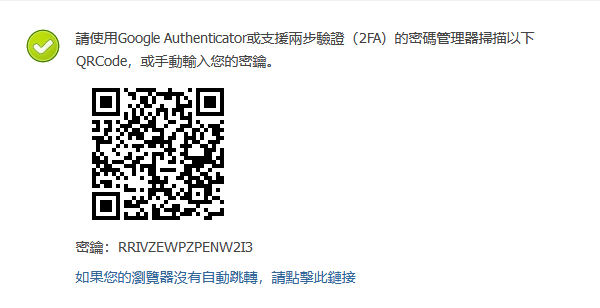
2.透過Google Authenticator或支援兩步驗證(2FA)的密碼管理器掃描QRCode,或手動輸入密鑰。
2022-11-7 03:21 上傳
下載附件
(14.64 KB)
3.完成!未來即可透過Google Authenticator進行驗證。
2022-11-7 03:27 上傳
下載附件
(20.87 KB)
*登入時若要使用Google Authenticator進行驗證請直接填寫驗證碼即可。
歡迎光臨 冰楓論壇 (https://bingfong.com/)
Powered by 冰楓